TestMu AI (formerly LambdaTest) pricing depends on the type of testing (manual, automated, or visual), the number of parallel sessions, and the subscription tier. It’s transparent but can become expensive when scaling concurrent automation or adding real devices. Below is a breakdown of their structure, hidden cost factors, and what to consider when comparing testing platforms.
The basics of TestMu AI pricing
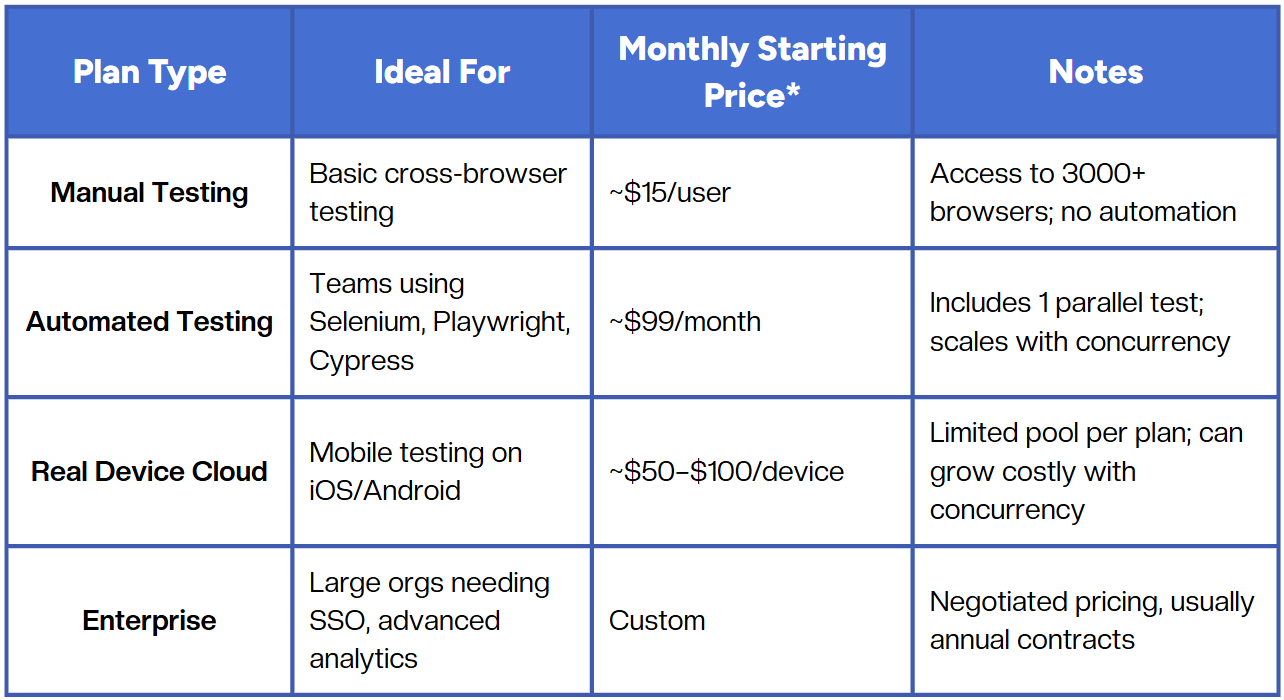
TestMu AI offers a mix of manual, automated, and real-device testing plans. Each plan is priced by the number of parallel tests and users, with optional add-ons for performance and visual regression.
Here’s how the main structure looks:
What drives costs up
Pricing in cloud-based testing isn’t just about base plans - it’s about how your team runs tests.
1. Concurrency
Each parallel test thread adds cost. Running 10 tests at once costs roughly 10x a single-thread plan. For CI/CD pipelines that trigger hundreds of runs per day, this scales quickly.
2. Real devices
Cloud emulation is cheaper, but if you need physical devices (for camera access, push notifications, biometrics), costs increase. Many teams underestimate this factor when budgeting.
3. Test frequency
TestMu AI has no hard usage caps, but frequent builds can consume concurrency faster. Teams often upgrade mid-cycle once they realize their builds queue up.
4. Seats and permissions
Each new engineer, tester, or CI account may require its own seat. The per-user model is often overlooked when estimating costs for distributed QA teams.
Comparing cost vs. value
Here’s a simplified breakdown of where value lies depending on the kind of QA setup you have:
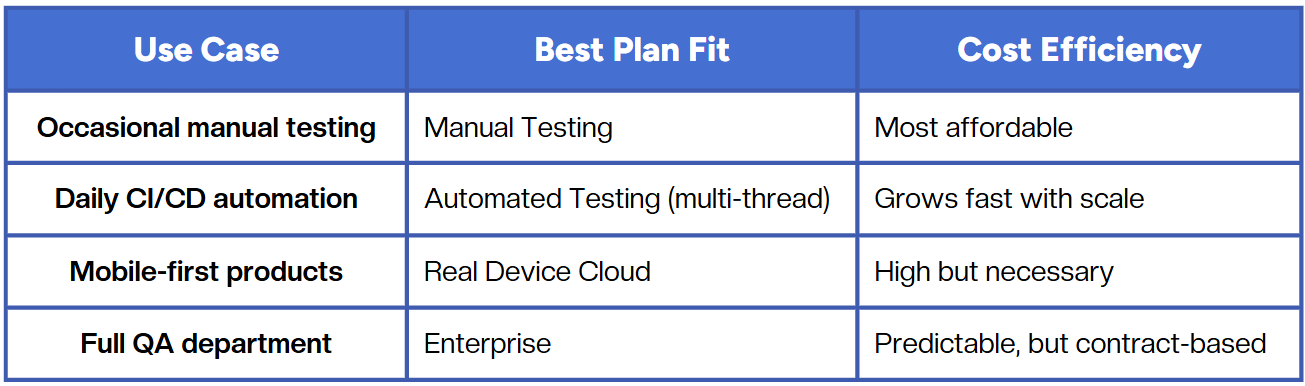
The key insight: cost per test often decreases when automation and infrastructure are tuned properly, not just by buying higher plans, but by minimizing flaky tests and redundant runs.
Hidden costs to watch for
- Maintenance time:
Even if platform costs are fixed, time spent maintaining flaky tests or reconfiguring environments can multiply the total cost of ownership. - Debugging overhead:
Some plans don’t include full video logs or network traces by default, requiring upgrades. - Data and retention:
Historical test results are limited in lower plans. Long-term analysis may need paid add-ons. - Integrations:
Some integrations (e.g., Slack, Jira, GitHub Actions) have quotas or API rate limits that affect usage.
How teams usually budget for automation
A reliable rule of thumb:
Automation ≠ cheap testing; automation = scalable testing.
A mid-sized engineering team (5–10 people) running tests daily across 3 environments often spends between $500–$1,500/month on cloud automation infrastructure, regardless of the provider.
Where teams lose efficiency is not in plan choice, but in how much manual upkeep their automation requires.
Platforms that auto-repair tests, detect environment drifts, or intelligently group failures usually end up reducing maintenance costs, even if their base plan looks higher.
Example: scaling from one to ten parallel tests
Here’s how TestMu AI pricing scales roughly for automation plans:
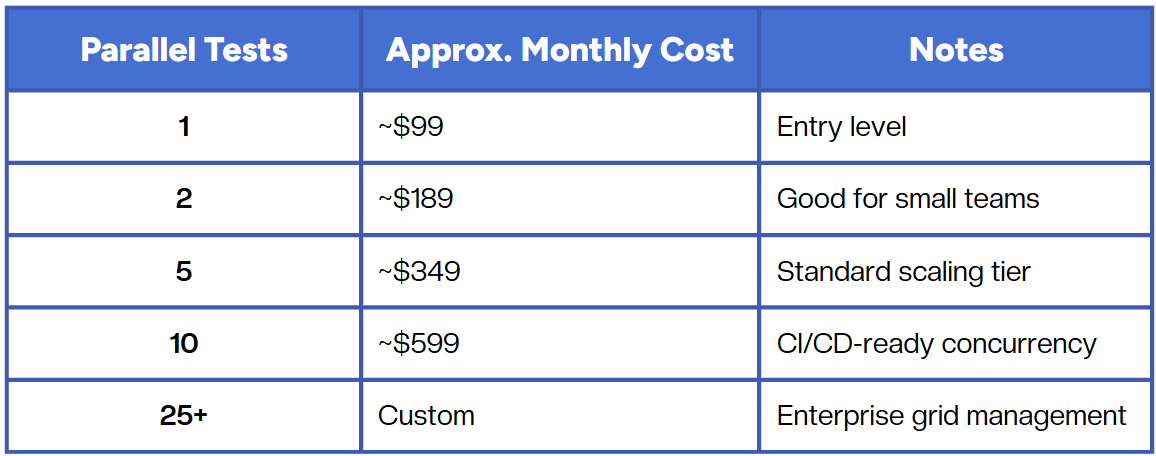
The jump isn’t linear - larger plans add advanced reporting, unlimited users, and better uptime SLAs.
Thinking about pricing differently
Instead of comparing plan costs alone, focus on:
- Execution time → How long does it take for all tests to finish?
- Reliability → How often do false failures slow releases?
- Maintenance effort → How much engineer time is spent fixing tests instead of improving them?
Cheaper tools can become more expensive if you spend weeks maintaining them. The real cost of QA lies in time-to-confidence, not dollars per seat.
Conclusion
TestMu AI’s pricing model is transparent and modular - you pay for concurrency, devices, and enterprise features as needed. But as testing scales, predictable pricing often comes from efficiency, not discounts. Understanding how your team runs, maintains, and analyzes tests will help you find the real cost baseline, whether in TestMu AI or any other automation setup.
Fast and reliable test automation


.png)