The TestMu AI (formerly LambdaTest) Capabilities Generator helps you set up browser and device configurations for your automated tests. But while it simplifies setup, many teams don’t realize how these configurations affect performance, scalability, and test reliability across CI/CD pipelines. Here’s a breakdown of what it does, how to use it efficiently, and what to watch out for when scaling your automation.
What the TestMu AI Capabilities Generator actually does
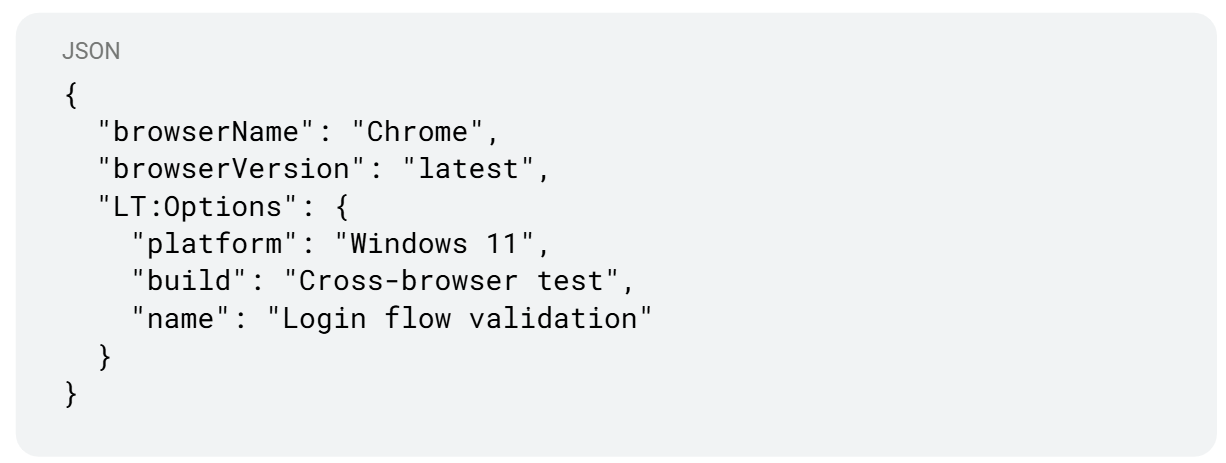
When you run automated tests in the cloud (with Selenium, Playwright, or WebDriver), you need to tell the remote system what environment to use, browser type, version, OS, device, screen resolution, and more. These configurations are known as capabilities.
Manually writing them can be tedious. The TestMu AI Capabilities Generator provides a quick way to:
- Select browsers and devices visually
- Generate the correct code snippet (JSON or language-specific)
- Copy-paste it into your automation config
This saves setup time and helps avoid syntax or version mismatches.
Why capabilities matter more than people think
The right combination of capabilities can make or break your test performance. Choosing too many environments slows down runs, while too few risks missing critical coverage.
Capabilities define:
- Which browsers and OS versions are tested
- Whether you’re using real or virtual devices
- Test distribution across grid nodes
- The reliability of visual rendering and UI interactions
Think of it as defining the “DNA” of your test environment - if your capabilities aren’t aligned with your product’s real user base, your coverage isn’t meaningful.
Common pitfalls teams run into
1. Over-configuring for “coverage”
Selecting every available device/browser pair leads to longer queue times and slower builds. It’s better to pick representative ones - the top browsers and OS versions used by your actual users.
2. Ignoring network or geolocation
Some tests fail only under specific latency or region-based settings. Capabilities can include network throttling or location; skipping this results in false positives.
3. Not version-locking browsers
When you use “latest” versions dynamically, updates can break selectors or change rendering overnight. Lock versions for stability, then roll forward intentionally.
4. Mixing local and remote configs
A common anti-pattern is running the same test suite locally and remotely without properly adjusting capabilities. Always separate environment configurations to avoid conflicts.
How to generate capabilities properly
- Go to the TestMu AI Capabilities Generator.
- Pick the language or framework (e.g., Playwright, Selenium, Cypress).
- Select:
- OS and version
- Browser type and version
- Screen resolution
- Optional: device name, network speed, timezone
- OS and version
- Copy the generated JSON or config code.
- Paste it into your capabilities section in your test configuration file.
Example snippet (Playwright + TestMu AI):
Beyond setup: making capabilities smarter with automation
Defining capabilities manually works fine for small teams, but as your pipeline grows, you’ll want to dynamically generate or optimize them.
Modern AI-assisted testing systems can:
- Infer browser usage trends automatically.
- Prioritize test environments based on failure history.
- Auto-retry tests only on relevant combinations.
This helps you maintain a lean, adaptive test grid without manual tuning. Instead of predefining everything, the system learns which configurations deliver the most meaningful signals.
Integrating capabilities into your CI/CD flow
Once generated, capabilities should live in version control - not manually edited each time. Keep them as code, and load them dynamically during your build.
Example workflow:
- Store capabilities in /config/capabilities.json.
- Use environment variables to control which subset runs (e.g., smoke, full-regression).
- Trigger parallel executions across relevant environments only.
This approach makes your test grid scalable, predictable, and CI-friendly.
When teams outgrow manual configuration
Manual capability generation is a great start, but as coverage expands and test ownership shifts between teams, it becomes easy to lose track of environments and priorities.
That’s why many teams now use AI-assisted orchestration layers - systems that understand test metadata, learn failure patterns, and adjust environments automatically. It’s no longer about writing capabilities once, but about keeping them relevant continuously.
Conclusion
The TestMu AI Capabilities Generator simplifies environment setup, but the real challenge is maintaining relevance as your product evolves. Think of capabilities not as static configs, but as dynamic parameters that should evolve with your test coverage and architecture. Whether managed manually or through an intelligent automation layer, clear configuration strategy keeps your tests reliable, fast, and scalable.
Fast and reliable test automation


.png)