TestMu AI (formerly LambdaTest) is a strong platform for cross-browser testing, but if you’re looking for more AI-driven automation, deeper CI/CD integration, or human-assisted quality assurance, there are newer and more adaptive tools worth exploring. Below are some alternatives that better fit different workflows - from small QA teams to large-scale engineering orgs.
Why teams are looking beyond TestMu AI
TestMu AI started as a reliable choice for browser and device compatibility testing. But as products scale and release cycles tighten, many teams are realizing that test automation isn’t just about coverage - it’s about velocity, reliability, and adaptability.
Modern QA teams want platforms that:
- Build and maintain tests automatically using AI.
- Integrate natively with GitHub, CI/CD, and cloud environments.
- Include real-time debugging, logs, and alerts.
- Offer human oversight when AI testing hits complexity limits.
The new generation of tools focuses on continuous validation, not just running tests in the cloud, but keeping them relevant as systems evolve.
1. BrowserStack
Best for: Enterprises with complex cross-device needs.
BrowserStack remains the largest cloud testing platform, offering 3,000+ device/browser combinations. Its strength lies in reliability and enterprise support. However, it’s primarily manual or semi-automated testing. For teams seeking AI-based test generation or maintenance-free automation, it might feel heavy and traditional.
Pros:
- Extensive real-device library
- Enterprise-grade stability and integrations
- Parallel execution
Cons:
- Slower test creation and maintenance
- Limited AI or intelligent test repair features
- Higher cost per seat for startups
2. Playwright + Test Automation Layers
Best for: Teams that want full control and customization.
Playwright (by Microsoft) has become a standard for open-source test automation. When combined with orchestration tools or custom pipelines, it offers flexibility and deep debugging, but also requires engineering effort.
Why teams choose this stack:
- Open-source, flexible, and fast.
- Multi-language support (TypeScript, Python, etc.).
- Powerful for CI/CD and containerized environments.
Downsides:
- Needs engineers to write and maintain tests manually.
- Requires infrastructure setup for scaling and reporting.
If you have a dedicated QA engineering team, it’s a great foundation. If not, managing flaky tests and parallel runs can slow down releases.
3. QA Wolf
Best for: Companies that want a fully managed automation service.
QA Wolf combines Playwright-based tests with a managed team. They promise full coverage in under 3 months and zero maintenance for clients.
Pros:
- Human + automation hybrid.
- Fast onboarding and clear reporting.
- CI/CD and PR integrations.
Cons:
- Locked into their ecosystem.
- Less transparency into underlying code.
This “done-for-you” model works best for product teams that want predictable automation without hiring an internal QA squad.
4. Rainforest QA
Best for: No-code teams and fast test creation.
Rainforest QA is designed for teams who need quick, lightweight regression testing without writing code. It’s cloud-based and uses visual workflows to run tests across browsers.
Pros:
- No-code setup.
- Good for marketing sites, eCommerce flows, and UI checks.
Cons:
- Less precise for complex logic and integrations.
- Not built for large engineering-driven QA pipelines.
Rainforest fits better for surface-level validation, not deep application logic.
5. QA DNA
Best for: Engineering teams that want both automation and human insight.
QA DNA blends AI-driven test automation with engineer oversight. The system can auto-generate, group, and repair tests across environments, while forward-deployed QA engineers verify, refine, and sign off results.
This combination ensures that:
- The AI accelerates coverage and runs tests continuously.
- Engineers maintain context, architecture awareness, and reliability.
- Results are clean, actionable, and integrated directly into pipelines.
It’s designed for teams tired of flaky automation or unclear ownership, offering predictable, scalable QA with real human intelligence behind it.
6. Testim.io
Best for: Visual testing and self-healing flows.
Testim uses machine learning to auto-heal tests when selectors change, reducing maintenance. It’s often adopted by teams focused on UI-heavy apps with frequent frontend updates.
Pros:
- ML-powered element detection.
- Visual editor for test creation.
- Integrates easily with CI tools.
Cons:
- Heavier pricing for advanced features.
- Can generate redundant or overlapping test cases at scale.
7. Katalon Platform
Best for: Balanced low-code + script-based automation.
Katalon provides both a UI-based test recorder and scripting for power users. It supports Web, API, Mobile, and Desktop testing, making it versatile for hybrid teams.
Highlights:
- Cross-platform coverage.
- Built-in analytics dashboard.
- Reasonable pricing tiers for small teams.
Trade-offs:
- Limited AI features compared to newer tools.
- Maintenance overhead for larger test suites.
Choosing the right alternative
The right tool depends on what “automation” means in your context.
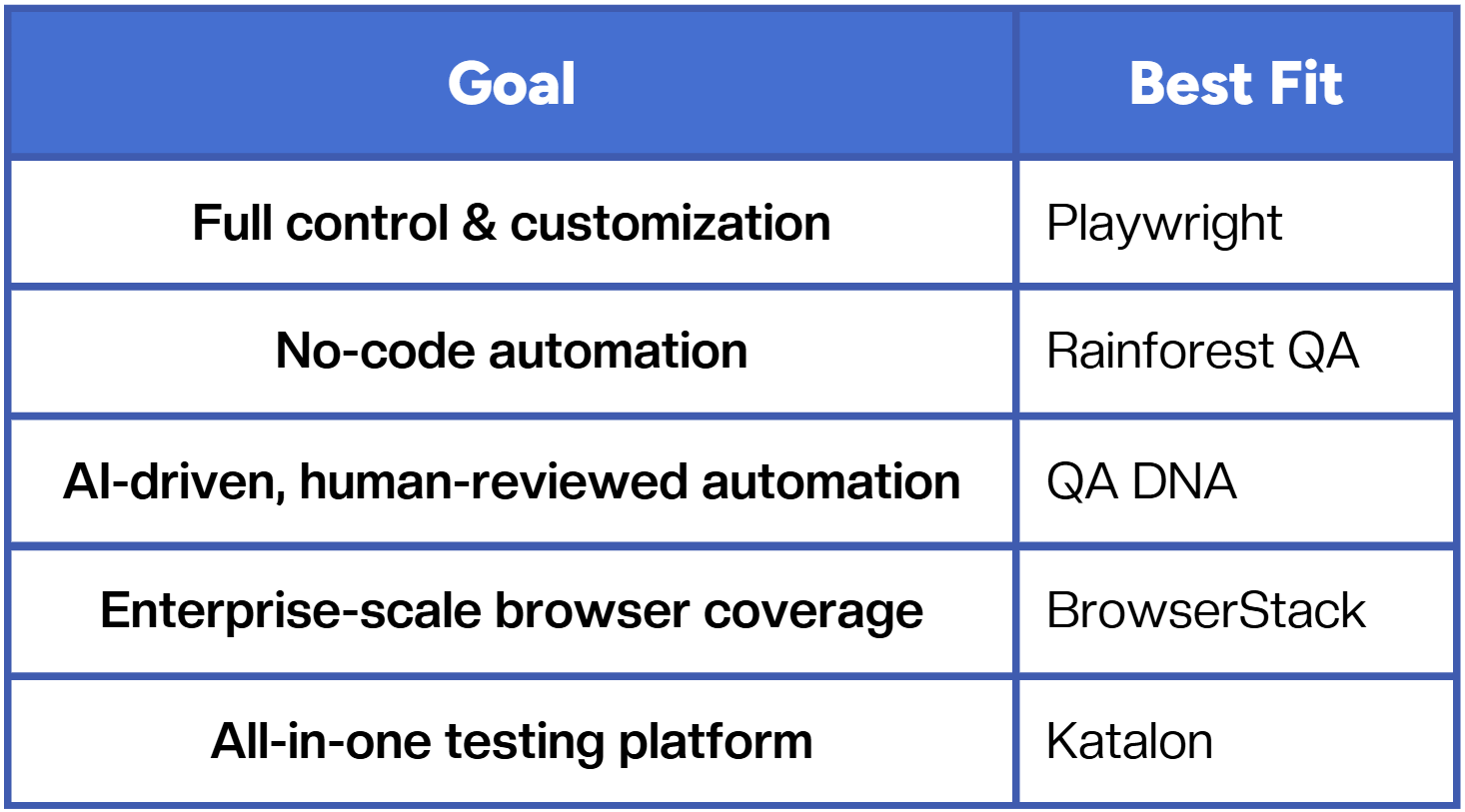
If you’re managing fast product cycles and want tests that evolve as your product does, consider solutions that combine AI adaptability with human assurance. It’s the only sustainable model as applications and architectures grow in complexity.
Conclusion
The QA landscape is shifting from manual and static testing toward agentic, adaptive, and continuous validation. Whether you choose to build your own setup or rely on managed automation, the key is to ensure tests remain reliable as your system evolves.
Fast and reliable test automation


.png)