Why visual and mobile testing matter
Most teams focus on verifying functionality - that buttons click, forms submit, and APIs respond. But modern QA extends far beyond that. With the explosion of screen sizes, layouts, and adaptive components, the same feature can look completely different across environments.
That’s where visual and mobile testing comes in. It ensures that what’s shipped is not just working, but looking and behaving consistently across browsers, devices, and resolutions.
Playwright provides this capability natively - no extra frameworks or plug-ins needed.
How Playwright supports visual and mobile testing
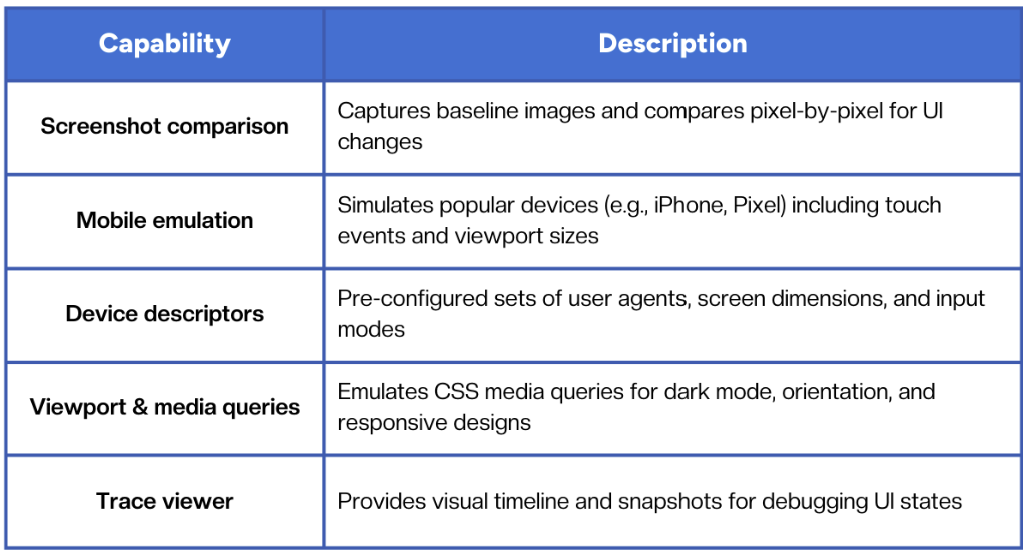
Playwright includes several built-in features that make visual regression and mobile testing possible out of the box:
Setting up visual comparisons in Playwright
The simplest way to perform a visual test is to compare the current UI against a known baselin
Example:
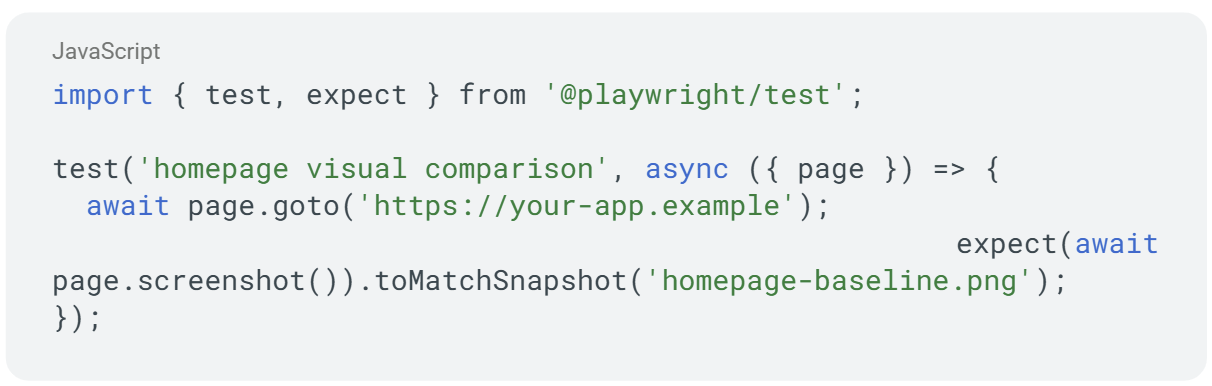
The first run generates a baseline image. Future runs compare current screenshots to it, highlighting even small pixel-level differences.
Best practices:
- Run visual tests on consistent environments (same OS, browser version, and viewport).
- Use threshold tolerances for acceptable pixel variance.
- Store snapshots in version control to review intentional UI updates.
Emulating mobile devices
Playwright includes a set of device descriptors covering popular phones and tablets.
Example:
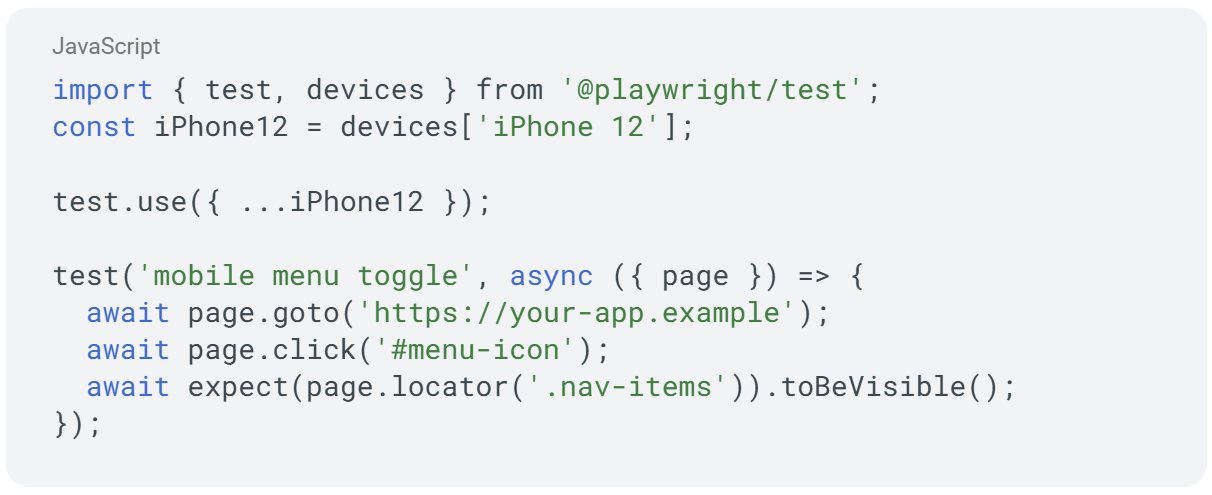
This simulates touch input, user agent, and screen size automatically, letting you validate both functionality and responsive layout within the same test flow.
Combining visual and mobile testing in CI/CD
When integrated into CI/CD pipelines, Playwright can run responsive and visual validations on every pull request.
Recommended setup:
- Use GitHub Actions or GitLab CI to trigger Playwright runs on commits.
- Capture screenshots for each key page or component.
- Compare against approved baselines.
- Upload results as build artifacts for review.
- Notify via Slack or GitHub comments if visual drift exceeds threshold.
This provides visual assurance alongside standard unit or integration tests, giving teams confidence that UI changes are intentional.
Managing baselines and visual drift
Visual testing can generate noise if not managed carefully. To keep things stable:
- Update baselines only when design changes are approved.
- Review diff reports manually before merging.
- Group tests by feature or component to limit re-runs.
- Automate cleanup of old snapshots to avoid bloating repositories.
The goal isn’t pixel-perfect uniformity, it’s to detect meaningful visual regressions that could affect usability or branding.
Real-device vs emulation: when it matters
Emulation covers most responsive and layout issues, but not all rendering behaviors. Certain differences - like GPU acceleration, font smoothing, or hardware-level gestures - appear only on real devices.
Use real devices when testing:
- Native mobile browsers (Safari iOS, Chrome Android).
- Gestures or sensors (swipe, scroll inertia).
- Device-specific UI components.
- Visual performance on constrained hardware.
A good practice is to combine Playwright emulation for quick coverage with real-device cloud testing for final validation.
Common challenges
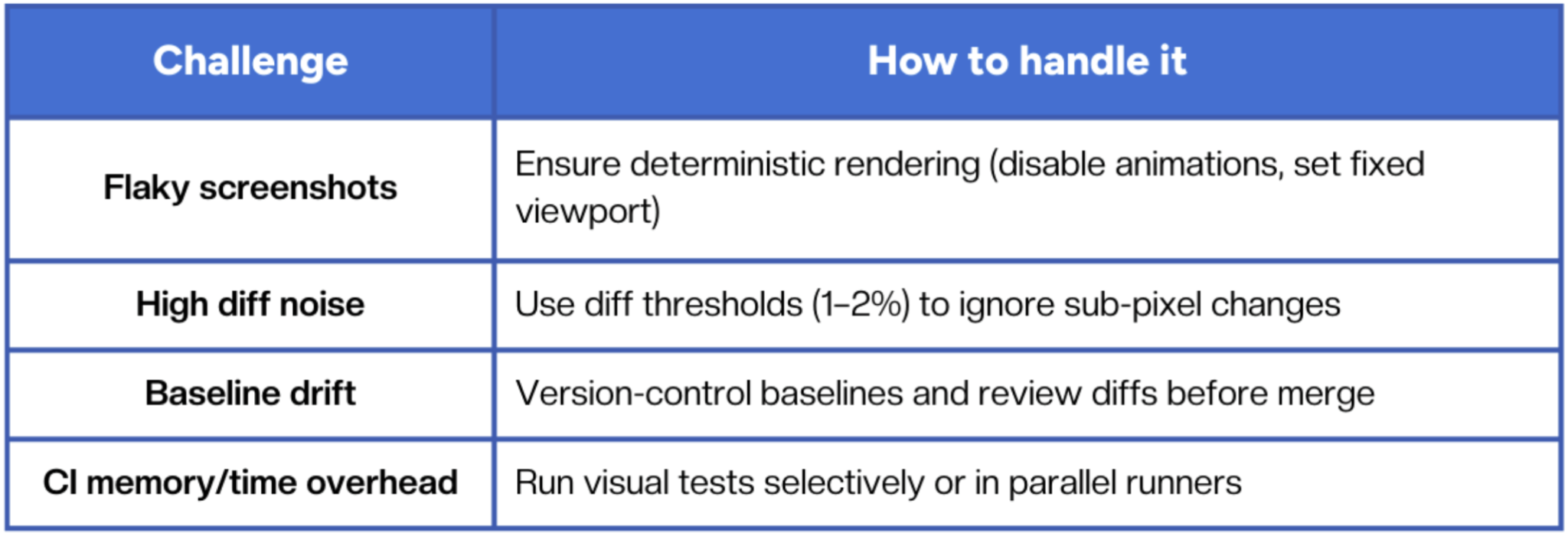
Visual automation brings enormous value, but it requires process discipline to keep test output meaningful.
The future of visual testing in automation
As automation frameworks evolve, AI-assisted visual validation is becoming a natural extension. Instead of comparing raw pixels, AI models can analyze semantic changes, detecting layout shifts or misaligned elements that actually impact UX.
Paired with self-healing test logic, this moves teams closer to fully adaptive testing, where visual validation becomes continuous, not reactive.
Conclusion
Playwright’s built-in visual and mobile testing capabilities make it far more than a functional automation tool. Used strategically, it helps teams verify not just that features work, but that they look and feel right across environments.
Reliable QA isn’t just about passing tests, it’s about consistent experiences, from desktop to mobile.
Fast and reliable test automation


.png)