Playwright is an open-source framework for automated end-to-end testing across browsers. It helps engineering and QA teams verify complex web applications faster and more reliably. For managers, understanding Playwright isn’t about learning syntax - it’s about recognizing how it changes the economics of testing: faster validation cycles, fewer regressions, and more stable releases.
Why testing changed - and why Playwright matters now
Traditional QA was built around manual test cycles and slow feedback loops. As product teams adopted CI/CD pipelines and feature-driven releases, that model broke down.
Developers needed faster, consistent ways to validate features, not days later, but within minutes of a pull request.
That’s where Playwright stepped in. It gives teams a code-first automation framework capable of running across all browsers, devices, and viewports, directly integrated into development workflows.
In short: Playwright made end-to-end testing developer-native, not a separate QA step.
What Playwright actually does
Playwright automates browser interactions: opening pages, clicking elements, filling forms, verifying results. But beyond the basics, it enables full coverage across browsers and platforms in a single API.
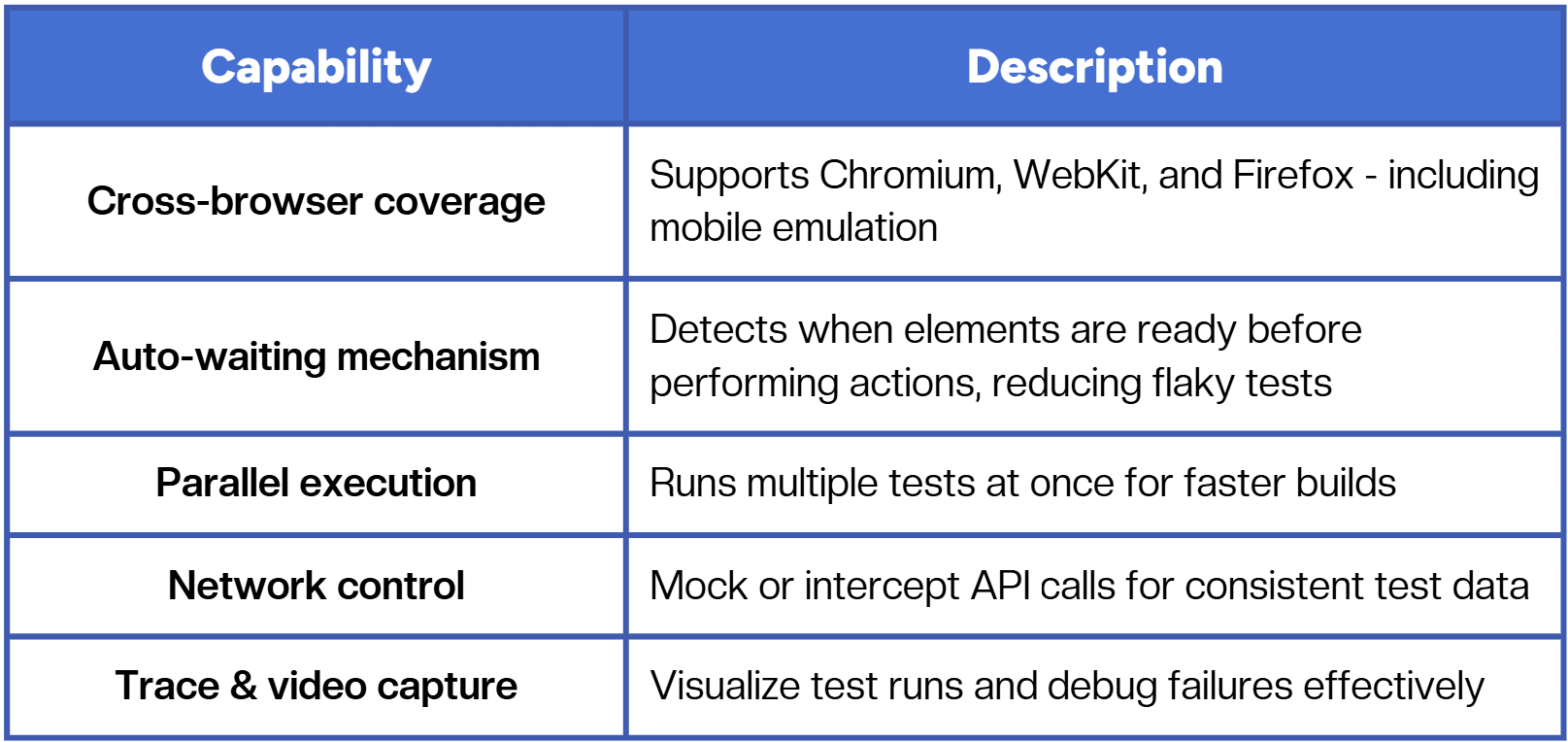
How Playwright fits into a QA strategy
For managers, the question isn’t “Should we use Playwright?” - it’s “How does Playwright fit into our overall testing architecture?”
Here’s a simplified breakdown:
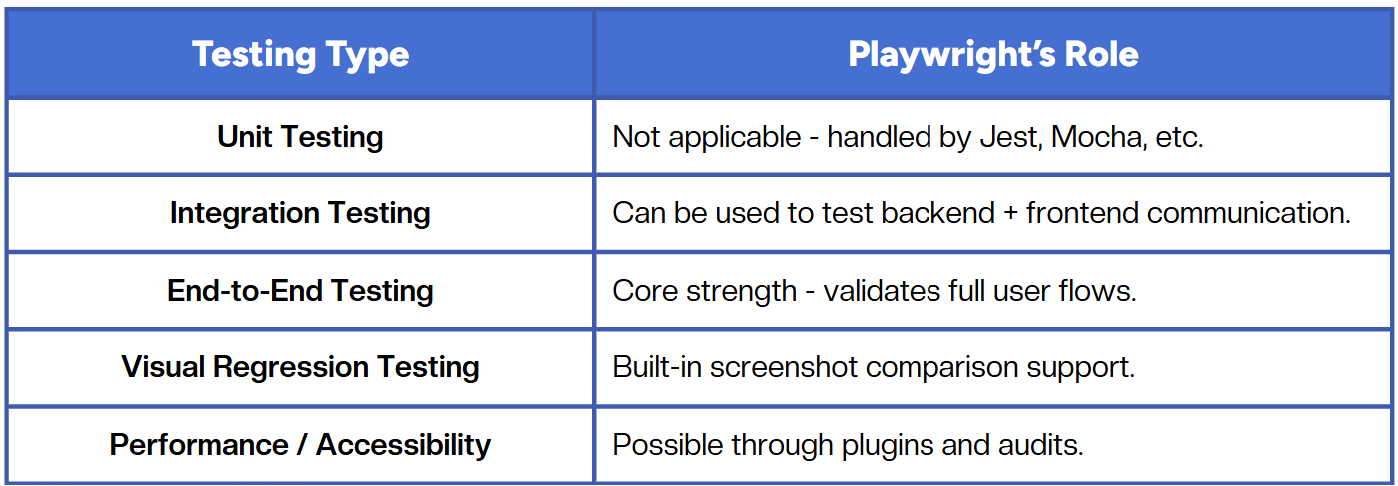
Playwright excels at end-to-end confidence: catching UI and workflow issues before they reach production.
Benefits managers actually notice
- Faster releases
CI-integrated tests mean bugs are caught earlier, reducing hotfixes and firefighting later. - Predictable automation costs
One framework replaces multiple browser tools and manual regression runs. - Reduced flakiness
Auto-wait and deterministic browser contexts improve test reliability, fewer “rerun and hope it passes” cycles. - Developer ownership of quality
Tests live close to the code, so QA becomes part of the development lifecycle, not a post-build activity.
Common challenges when adopting Playwright
Playwright is powerful, but like any framework, it’s not plug-and-play for large teams.
Typical adoption challenges:
- Lack of internal expertise on automation architecture.
- Difficulty maintaining large test suites.
- Limited visibility into test coverage or historical trends.
- Increased CI time if tests aren’t optimized for parallel execution.
Without proper structure and test ownership, Playwright suites can quickly grow brittle, especially when scaling across multiple products or environments.
How modern QA teams structure Playwright adoption
The most effective teams treat Playwright as part of the engineering system, not a side tool owned by QA.
A typical setup looks like this:
- Start small - a focused smoke suite covering core user flows.
- Integrate early - connect Playwright to pull requests in CI (GitHub Actions, GitLab CI, Jenkins).
- Automate environment setup - use Docker or environment variables to avoid config drift.
- Parallelize tests - keep runtime under 10 minutes to fit CI feedback loops.
- Version control reports and traces - make debugging reproducible across teams.
This approach builds momentum while keeping automation maintainable and aligned with development velocity.
Why Playwright fits modern pipelines
Playwright was designed for continuous testing. It runs efficiently in headless browsers, works with containerized CI environments, and integrates directly with existing engineering stacks.
That means QA can shift from being a bottleneck to being a continuous signal - tests that run automatically, report clearly, and guide teams toward stability rather than slow them down.
Playwright vs older frameworks
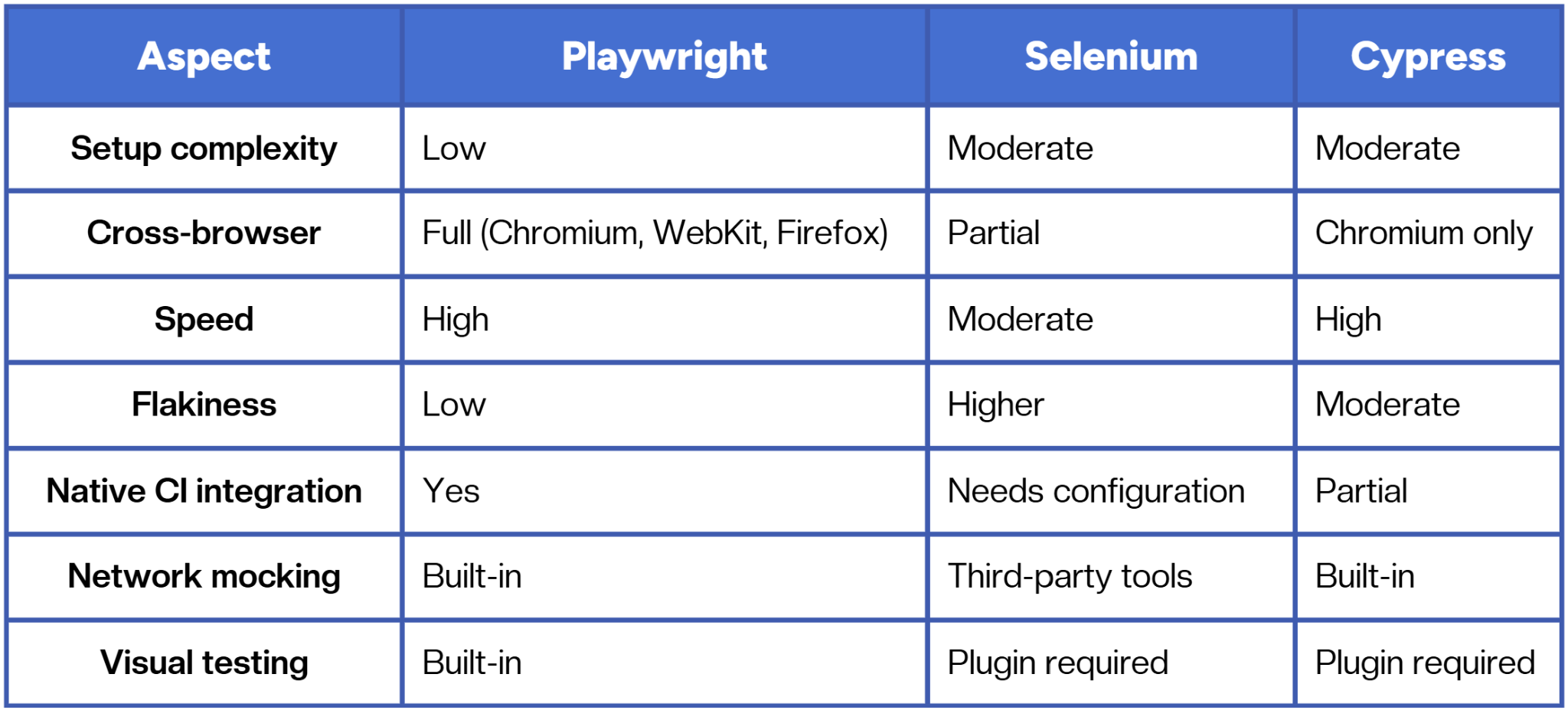
Playwright’s biggest edge is that it’s developer-native and modern - built with today’s web architectures in mind, not retrofitted from earlier browser automation designs.
Key takeaways for managers
- Playwright provides reliable end-to-end coverage that scales with development speed.
- Adoption works best when engineers and QA collaborate, not when it’s siloed.
- The biggest ROI comes from maintainability and speed, not the number of tests.
- Success depends on workflow design: CI efficiency, parallelization, and test data strategy.
It’s not about automating everything. It’s about automating what matters most, and ensuring those tests evolve alongside your product.
Conclusion
Playwright isn’t just another testing tool, it’s a framework for modern QA thinking. It aligns testing with how engineering teams actually ship software: fast, iterative, and collaborative. For managers, it’s less about test code and more about creating systems that build trust in every release cycle.
Fast and reliable test automation


.png)