Why API-Based Testing Integrations Matter
Modern QA teams rely on speed, consistency, and automation. As test coverage grows and release cycles accelerate, manual interaction with testing platforms quickly becomes a bottleneck. That’s where APIs change everything - turning testing infrastructure into something programmable, scalable, and easy to orchestrate.
BrowserStack’s API allows developers and QA engineers to control sessions, retrieve test data, trigger builds, and manage environments without ever opening the UI. But beyond that, API-based testing is about integration - ensuring QA processes fit seamlessly within CI/CD pipelines and across multiple automation frameworks.
The key question for most teams today isn’t “Should we automate?” - it’s “How can we make automation adaptable and intelligent enough to keep up with product velocity?”
What BrowserStack’s API Can Do
BrowserStack exposes RESTful APIs that enable direct interaction with its cloud infrastructure. This means you can automate environment creation, fetch test results, and integrate test execution directly into your CI/CD pipeline.
Core Capabilities
- Session Management: Start, stop, and retrieve test sessions programmatically.
- Automated Builds: Trigger builds automatically from Jenkins, GitHub Actions, or custom CI scripts.
- Test Metadata: Collect logs, screenshots, and video reports for each test run.
- Parallel Execution: Distribute tests dynamically across multiple browsers and devices.
Example Use Case
Imagine a pipeline where each pull request triggers a Playwright or Selenium build. The BrowserStack API can automatically:
- Allocate browsers and devices
- Run the tests
- Collect results and logs
- Push pass/fail data back into your dashboard or Slack channel
This structure minimizes manual handling and ensures your QA pipeline runs continuously, a necessity for teams with multiple parallel development streams.
Common Challenges with BrowserStack API
While BrowserStack’s API is powerful, it’s not without complexity. Some of the most common hurdles include:
- Authentication Management: Handling API keys securely across environments.
- Test Result Correlation: Linking API responses to test management tools.
- Rate Limits: Managing throttling when running thousands of concurrent tests.
- Lack of Self-Healing: Test scripts often fail when UI elements or selectors change, requiring manual updates.
These issues highlight a growing gap: while APIs make integration easier, maintaining intelligent orchestration still depends on human oversight, unless the testing framework itself adapts dynamically.
Evolving Toward Platform-Enabled QA
BrowserStack APIs are built for access; platform-enabled QA is built for intelligence.
Instead of simply triggering tests through REST endpoints, platform-enabled services connect every layer of the QA process, from execution to analysis, into one adaptive system.
In this model:
- APIs are not endpoints; they’re signals. The platform interprets results, detects flaky behavior, and prioritizes reruns.
- AI automation identifies recurring issues and automatically applies fixes where possible.
- Self-healing mechanisms repair broken test scripts without developer input.
- Data orchestration ensures test results flow back into pull requests, analytics, and dashboards instantly.
This transforms the QA process from reactive to proactive, where every run contributes to system learning, not just verification.
Integrating BrowserStack API Within a Platform Workflow
To make the most of BrowserStack’s API, it should be embedded inside a broader orchestration layer rather than used manually.
A Typical Integration Flow
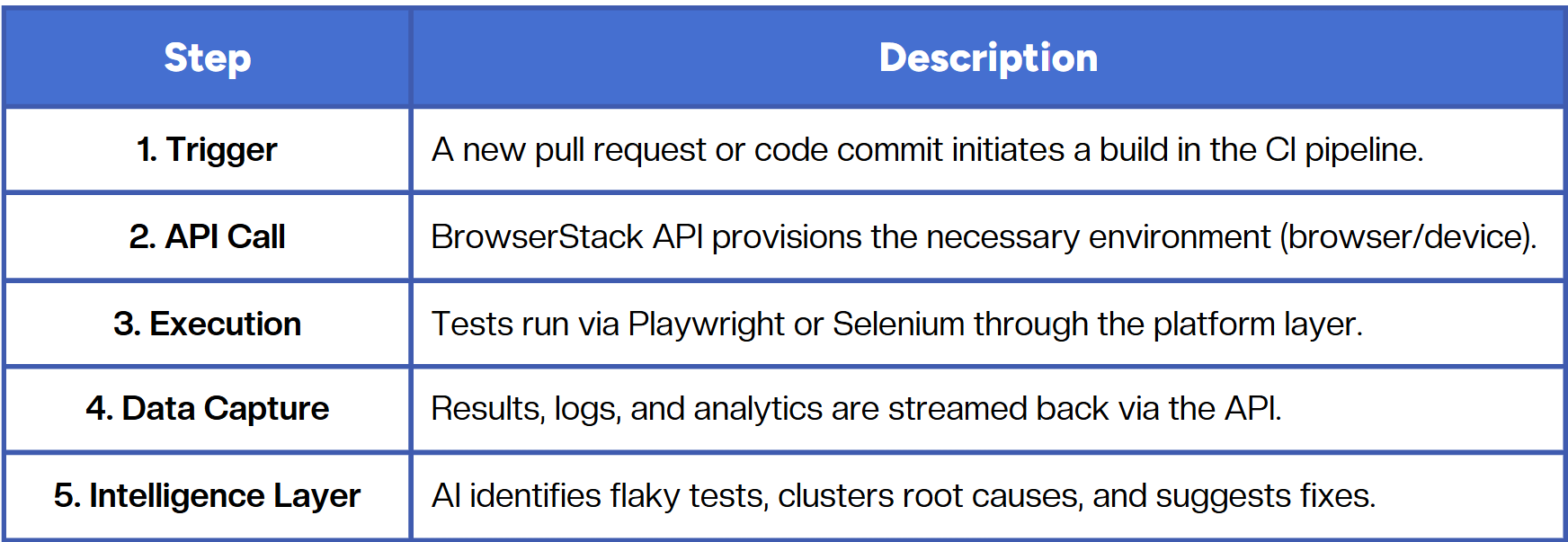
This creates an end-to-end automated feedback loop, from code push to quality signal, reducing time to insight and increasing confidence in every release.
BrowserStack API vs. Platform-Enabled QA Automation
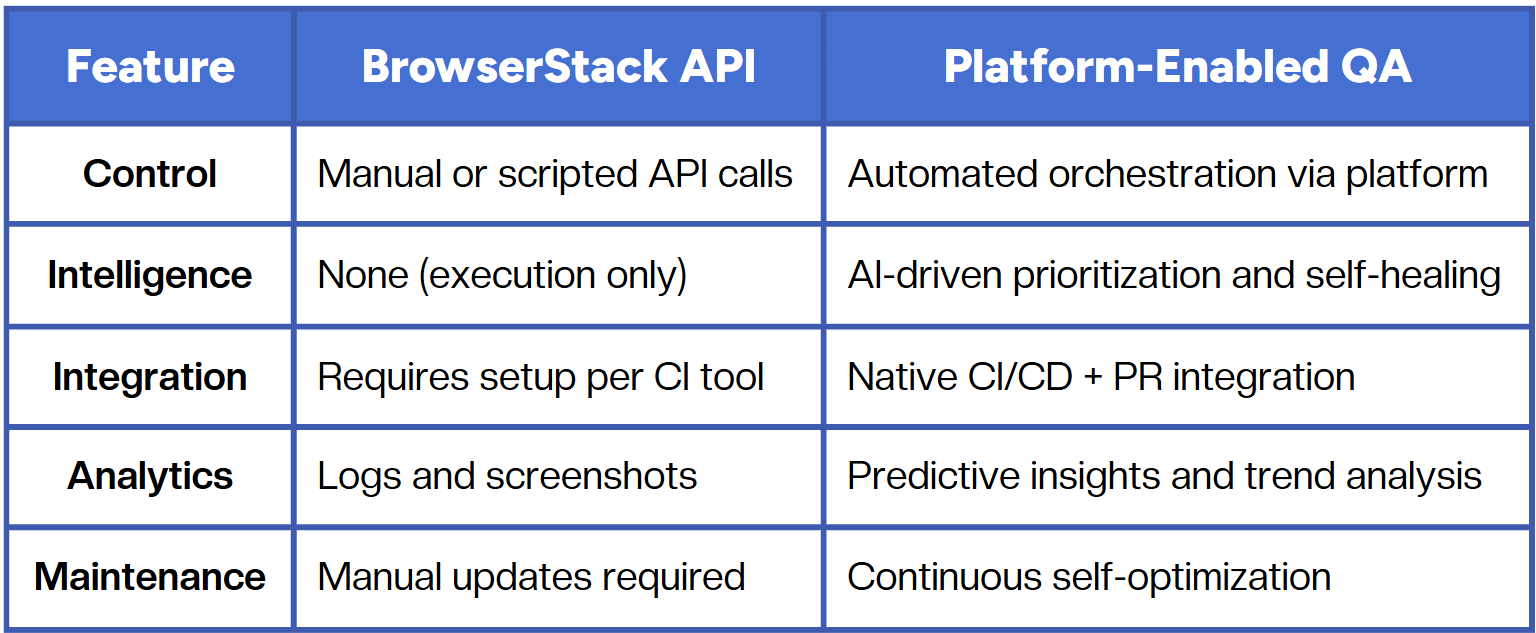
APIs offer flexibility; platform-enabled testing offers adaptability. The best approach often combines both, using BrowserStack’s infrastructure for execution and an intelligent orchestration layer for resilience and insight.
Best Practices for API-Based QA Automation
- Secure API Access: Rotate keys and use environment variables for CI/CD pipelines.
- Automate Result Collection: Send API data directly into your analytics or reporting tool.
- Integrate Early in CI/CD: Don’t wait until the end of your pipeline to validate results.
- Combine APIs with AI Orchestration: Use a platform layer to interpret and act on data, not just collect it.
- Monitor Stability Over Time: Use historical API data to detect regressions or flaky patterns.
Conclusion
BrowserStack’s API unlocks automation at scale, but API access alone isn’t enough to make QA efficient, adaptable, or intelligent. The future lies in platform-enabled orchestration, where API data fuels continuous learning and test optimization.
By connecting automation, analytics, and human insight in a unified workflow, QA evolves from an isolated function into a self-improving system, one that scales with your code, your pipelines, and your team.
Fast and reliable test automation


.png)