Why Accessibility Testing Matters More Than Ever
Building accessible software isn’t just about compliance, it’s about inclusivity and usability for everyone. Accessibility testing ensures that applications can be navigated and understood by users with different abilities, across devices, browsers, and assistive technologies.
Yet, many QA teams struggle to maintain accessibility checks as part of their regular automation workflows. Accessibility issues often slip through manual reviews or are discovered late in the cycle, making them costly to fix. The challenge lies in bringing accessibility testing into the continuous testing process, without slowing down releases or overloading teams.
BrowserStack provides a practical solution by allowing accessibility checks to be run directly in the cloud on real browsers and devices. But how effective is it when integrated into modern CI/CD pipelines, and how does it compare to AI-powered testing approaches?
How BrowserStack Handles Accessibility Testing
BrowserStack offers built-in tools and integrations that allow teams to perform accessibility audits on web applications. These typically rely on established open-source engines like axe-core or Lighthouse, which flag common accessibility violations based on WCAG (Web Content Accessibility Guidelines).
Core Capabilities
- Automated Accessibility Scans: Identify missing alt text, color contrast issues, and keyboard navigation problems.
- Real Device Testing: Validate accessibility behavior on mobile devices and assistive tools.
- Integrations: Works with frameworks like Cypress, Playwright, and Selenium for combined functional and accessibility checks.
- Reporting: Offers detailed logs and snapshots highlighting the issues detected per page or component.
Limitations
While useful, BrowserStack’s accessibility coverage is still rule-based, not context-aware. It detects violations but can’t always prioritize or explain their real-world impact. This leads to repetitive manual triage, especially in large-scale test runs.
Shifting Toward Intelligent Accessibility Testing
Modern accessibility testing is moving beyond static scans. Teams are beginning to use AI-assisted automation to not only detect but also interpret accessibility problems - reducing false positives and highlighting critical paths.
An AI-driven approach can:
- Learn from test history to identify recurring accessibility gaps
- Prioritize high-impact issues across builds
- Automatically retest previously fixed components for regression
- Integrate with pull requests to catch issues before merging
When combined with self-healing automation, accessibility checks can stay stable even when the UI changes, something traditional BrowserStack setups struggle to maintain without constant script updates.
Accessibility in Continuous Integration Pipelines
Integrating accessibility into CI/CD is no longer optional. Many teams use Playwright or Cypress for test automation and need accessibility validation to run within the same pipelines.
Here’s a simplified approach:
- Run Functional Tests: Validate behavior and responsiveness using your standard test suite.
- Trigger Accessibility Scan: Automatically analyze each tested page with an accessibility engine or AI-powered plugin.
- Generate Reports: Collect insights on violations and trends directly within the build report.
- Fix and Re-run: Use automation to verify that accessibility regressions are resolved.
This workflow reduces friction between QA and development, ensuring accessibility testing becomes part of every commit, not an afterthought.
BrowserStack vs. Platform-Enabled AI Testing
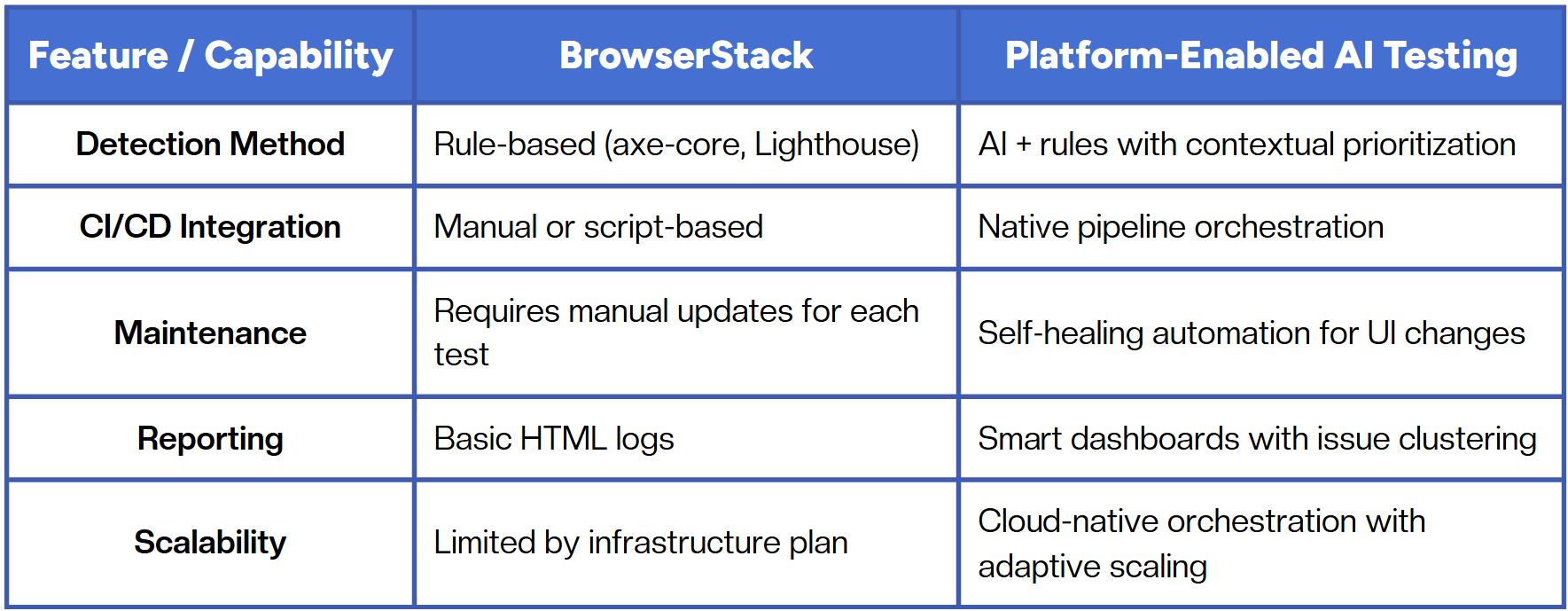
The key difference lies in intelligence vs. infrastructure. Traditional accessibility testing focuses on execution, while platform-enabled approaches focus on understanding and optimization.
Best Practices for Scalable Accessibility Testing
To build a sustainable accessibility strategy, teams should:
- Combine functional and accessibility checks within the same pipeline.
- Use AI-driven insights to prioritize the most impactful issues first.
- Continuously monitor test coverage across devices and browsers.
- Automate retesting after UI or code updates to prevent regressions.
- Include accessibility in pull requests to shift feedback left.
Automation should not just test accessibility, it should help maintain it continuously, with minimal manual oversight.
Conclusion
Accessibility testing is evolving from manual review to intelligent automation. Tools like BrowserStack make it easy to get started, but scalability depends on how seamlessly accessibility can be embedded into continuous testing.
The future lies in platform-enabled QA, where accessibility is not a separate task but part of an adaptive, AI-assisted workflow. This shift allows teams to deliver not only faster but fairer software, inclusive by design, and reliable by automation.
Fast and reliable test automation


.png)